Compete in 100% automated tournaments via Browser, WhatsApp, or Telegram. Auto-generated room codes, smart timezone matching, and instant API score verification. No screenshots, no disputes — just play.
You only link your VR headset ONCE. After that, joining any tournament takes 1 click forever!
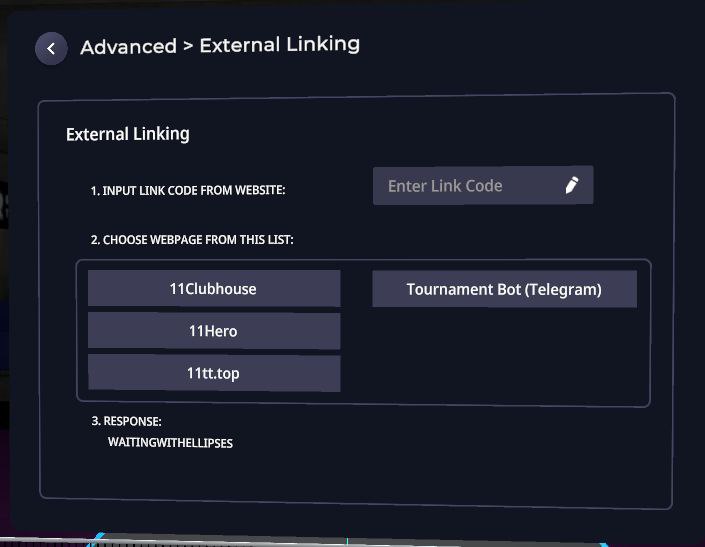
Open Settings inside Eleven Table Tennis VR, click External Linking to get your 4-digit code, and enter it on our Web Portal, WhatsApp, or Telegram. Done forever!
Join any tournament in 1 click. When your match starts, the system automatically generates your unique room code (e.g., SAPR58) and coordinates match times across timezones.
Enter the room code via the Carrot icon (🥕) in Eleven VR and play your Ranked match. Our Smart Referee automatically reads the official score from the game API, extracts 3D replay codes, and advances the bracket!
Live updates from official Telegram: ElevenVrBot_news. Accessible to everyone without Telegram subscription!
Experience the intensity of Eleven Table Tennis tournaments
Everything for top-tier tournament organization
Player registration, match brackets and results. All information in one place.
Integration with ElevenVR API for automatic match result verification and winner determination.
Internal rating system based on results from all tournaments and matches.
Automatic player distribution into leagues: Gold, Silver, and Bronze.
Full support for English and Russian languages in the bot and admin panel.
Powerful web panel for managing tournaments, players, and content.
Built on modern and reliable technologies
Compete, grow your rating, and join the global ETT community without the hassle of manual reporting.
Join a MatchHost professional tournaments in seconds. Automated brackets, match validation, and web management dashboard.
Host a TournamentAnswers to popular questions
Open the @elevenvrbot in Telegram, register, and choose a tournament from the list. The system will automatically determine your league based on ElevenVR data.
ELO is an internal rating system based on the ELO algorithm. It tracks the results of all your tournament matches and reflects your skill level.
The system integrates with the ElevenVR API and automatically fetches match results directly from the game. This eliminates cheating and ensures tournament fairness.
Tournament creation is available to administrators via the web panel. Contact elevenvr.net community organizers for access.
Yes, ELOTTBOT is an open-source project created for the elevenvr.net community. Participation in tournaments is absolutely free.
Type the bot's username @elevenvrbot and the player's name in any chat. If they are registered, you can click 'Challenge' to notify them.
Yes, you can withdraw from a tournament at any time before it starts. Open the Tournaments menu in the bot, select the tournament, and click the "Leave Tournament" button. Once the tournament has started, withdrawal is no longer possible.
Join hundreds of players worldwide in automated Eleven VR esports.